
Every time an order is created a unique waybill is dynammically assigned to it. Order creation required all the important details of products like ,seller details, warehouse details, quality checks, consignee name, phone and address and other important information. The process of order creation is same for both the forward flow (client warehouse to end customer) and reverse flow (customer to client warehouse) with the only difference in the package_type key. (Pickup for reverse package and COD or Prepaid for forward package) Two type of shipments can be there: Single Piece Shipment - One waybill here represents a package which can have multiple items in it. (Example, An order at marketplace can have multiple items like tshirts, shoes, shampoo package together in a box) Multi Piece Shipment - This type of shipments contain multiple boxes in one order. All the shipments are packed in separate boxes and so should be assigned separate waybill numbers as well. **E-waybill**: As per government guidelines, if the total shipment cost exceeds 50,000, then there is requirement of e-waybill, which needs to be passed from the client end.This is a mandatory field required at the time of order creation (if the shipment cost exceeds 50,000 INR)
| Production Environment URL |
| https://api.sarlogistics.in/api/order_to_dashboard |
Important Points which needs to be considered while order creation:
curl --request POST \
--url "https://api.sarlogistics.in/api/order-creation " \
--header "Content-Type:application/json"\
--header "Authorization: Token XXXXXXXXXXXXXXXXXX" \
--data '
{
"orderid": "",
"warehousename": " ",
"order_date": "",
"shipment_description": "",
"item_count": "",
"total_value": "",
"fragile_items": "",
"delivery_first_name": "",
"delivery_last_name": "",
"delivery_phone_number": "",
"delivery_address1": "",
"delivery_country": "",
"delivery_pincode": "",
"delivery_state": "",
"delivery_city": "",
"shipment_length": "",
"shipment_height": "",
"shipment_width": "",
"shipment_weight": "",
"mode_of_shipment": "",
"mode_of_payment": "",
"cod_amount": ""
}'
The Pincode Serviceability API is used to validates whether the specific pincodes are serviceable by SAR logistics or not.
| Test Environment URL |
| https://workstation.cnetworq.com/API-sar/API/Pin-code-Serviceability?token=XXXXXXXXXXXXXXXXXX&filter_codes= |
| Production Environment URL |
| https://api.sarlogistics.in/api/Pin-code-Serviceability?token=XXXXXXXXXXXXXXXXXX&filter_codes= |
| Params | Mandatory | Value Type | Description |
| filter_codes | Optional | Integer | Pincodes which you want to check for Serviceability, please enter one pincode at a time. |
curl --request GET \
--url "https://api.sarlogistics.in/api/Pin-code-Serviceability?token=XXXXXXXXXXXXXXXXXX&filter_codes="\
--header "Content-Type:application/json"\
Waybill is the unique number which is assigned to every shipment that moves in SAR logistics network. Bulk waybill API generates the waybill list in advance which can be stored and used in order creation API, Any number of waybill can be downloaded from this API by specifying a count.
Below are limitations for Bulk Waybill Api:
| Test Environment URL |
|
https://workstation.cnetworq.com/API-sar/API/fetch-waybill?token=XXXXXXXXXXXXXXXXXX&client_name=&count= |
| Production Environment URL |
|
https://api.sarlogistics.in/api/fetch-waybill?token=XXXXXXXXXXXXXXXXXX&client_name=&count= |
| Params | Mandatory | Value Type | Description |
| client_name | Optional | String | Name of the client |
| count | Yes | Integer | Specify the number of waybills which you want to fetch in one go. |
curl --request GET \
--url " https://api.sarlogistics.in/api/fetch-waybill?token=XXXXXXXXXXXXXXXXXX&client_name=&count=" \
--header "Content-Type:application/json"\
| Note: |
| Please note the list fetched from the API will be different from the files shared at the time of sign-up / onboarding. While creating the order if you do not want to assign any waybill to the order, our order creation API will assign the waybill dynamically to the order in the response. Note: Theis dynamic assignment is only possible in case of regular B2C order, not for multi piece shipments. |
Every time an order is created a unique waybill is dynammically assigned to it. Order creation required all the important details of products like ,seller details, warehouse details, quality checks, consignee name, phone and address and other important information. The process of order creation is same for both the forward flow (client warehouse to end customer) and reverse flow (customer to client warehouse) with the only difference in the package_type key. (Pickup for reverse package and COD or Prepaid for forward package) Two type of shipments can be there: Single Piece Shipment - One waybill here represents a package which can have multiple items in it. (Example, An order at marketplace can have multiple items like tshirts, shoes, shampoo package together in a box) Multi Piece Shipment - This type of shipments contain multiple boxes in one order. All the shipments are packed in separate boxes and so should be assigned separate waybill numbers as well. **E-waybill**: As per government guidelines, if the total shipment cost exceeds 50,000, then there is requirement of e-waybill, which needs to be passed from the client end.This is a mandatory field required at the time of order creation (if the shipment cost exceeds 50,000 INR)
| Test Environment URL |
| https://workstation.cnetworq.com/sarlogistics/testing/order-creation |
| Production Environment URL |
| https://api.sarlogistics.in/api/order-creation |
Important Points which needs to be considered while order creation:
There are 2 ways client can provide the GST related information as below.
A client can pass the information through API (fields are given below) OR he can share the information one time with our business / Account manager. The client should have received an email from us a link where you have to update the GST related information one time.
Seller_gst_tin and hsn_code are mandatory in API and these fields need to be added only in Package/Order creation API, not in Vendor/Warehouse creation API
Meaning of RVP- this is a case where shipment needs to be pick from the customer and delivered to the client warehouse else the specified location given by the client.**
Order creation API for RVP- API URL and payload will be the same as forward but you need to make few changes as given below.
Replacement is a service where customer raise replacement request of the product to the client and client create a replacement order by order creation API. We pick the first shipment from the client location and deliver it to the end customer and at the same time pick the second shipment from the customer ad deliver back to the client location. The life cycle of the shipment includes both forward and reverse flow.
Payload will be the same as reverse shipment except payment_mode, it will be REPL.
curl --request POST \
--url "https://api.sarlogistics.in/api/order-creation " \
--header "Content-Type:application/json"\
--header "Accept:application/json"\
--header "Authorization: Token XXXXXXXXXXXXXXXXXX" \
--data '
{
"name": "",
"add": " ",
"pin": "",
"city": "",
"state": "",
"country": "",
"phone": "",
"order": "",
"payment_mode": "",
"return_pin": "",
"return_city": "",
"return_phone": "",
"return_add": "",
"return_state": "",
"return_country": "",
"products_desc": "",
"hsn_code": "",
"cod_amount": "",
"order_date": "",
"total_amount": "",
"seller_add": "",
"seller_name": "",
"seller_inv": "",
"quantity": "",
"waybill": "",
"shipment_width": "",
"shipment_height": "",
"weight": "",
"seller_gst_tin": "",
"shipping_mode": "",
"address_type": "",
"pname": "",
"padd": "",
"pcity": "",
"ppin_code":,
"pcountry": "",
"pphone": ""
}'
| Test Environment URL |
| https://workstation.cnetworq.com/API-sar/API/order-edit |
| Production Environment URL |
| https://api.sarlogistics.in/api/order-edit |
Package edit API allows to update package details(as mentioned below) after manifestation.This is an advance API integration where the details can be changed or corrected at later stage as well. Note : It's a POST API Url.
CURL
curl --request POST \
--url "https://api.sarlogistics.in/api/order-edit" \
--header "Content-Type:application/json"\
--header "Accept:application/json"\
--header "Authorization: Token XXXXXXXXXXXXXXXXXX" \
--data
'{"waybill":"","phone":"","name":"","add":"","product_details":"","shipment_length":,"shipment_width":,"shipment_height":,"weight":"","pt":"","cod":""}'
Cancel Order API facilitates cancellation of an existing package/order. It comes under advance API integration, as order can be cancelled from CL Panel as well.
It is POST API call. It accepts the payload data in JSON format and also returns a response in JSON.
Keys that can be updated :
"cancellation": "true"
Allowed statuses to cancel a package :
Manifested In Transit Pending Open Scheduled
Note: When an order is cancelled via the cancellation API the following conditions hold good for each type of package:
Prepaid / COD - Status of the package changes to "Returned". Pick Up - Status of the package changes to "Cancelled".
curl
curl --request POST \
--url "https://api.sarlogistics.in/api/order-cancel" \
--header "Content-Type:application/json"\
--header "Accept:application/json"\
--header "Authorization: Token XXXXXXXXXXXXXXXXXX" \
--data
'{"waybill":"","phone":"","name":"","add":"","product_details":"","shipment_length":,"shipment_width":,"shipment_height":,"weight":"","pt":"","cod":""}'
Package tracking API retrieves the package details and the current status of the package. The package / order can be one of the following types: Pre-paid (delivery of a package for which payment has already been made), COD (delivery of a package for which cash needs to be collected), Pickup (pickup of a package from customer's address and delivering it to client warehouse).
Shipment Tracking can be done by either of the two ways, either, using Pull API or Push API
| Test Environment URL |
| https://workstation.cnetworq.com/API-sar/API/tracking-order?token=XXXXXXXXXXXXXXXXXX&waybill= |
| Production Environment URL |
| https://api.sarlogistics.in/api/tracking-order?token=XXXXXXXXXXXXXXXXXX&waybill= |
| Params | Mandatory | Value Type | Description |
| waybill | Either waybill or ref_ids | String | Waybill number for which the status is to track. |
curl --request GET \
--url
"https://api.sarlogistics.in/api/tracking-order?token=XXXXXXXXXXXXXXXXXX&waybill=" \
--header "Content-Type:application/json"\
This API facilitates calculation of the shipping charges for the shipments. This is to be noted that it roughly calculates the charges and give approximated values only.
The parameters which can be used for calculating the invoice details in the table below the table enlists all the keys, mandatory keys mentioned as M and Optional with O have also been highlighted
| Test Environment URL |
| https://workstation.cnetworq.com/API-sar/API/invoice-shipping-charge?md=&cgm=&o_pin=&d_pin=&pt=&cod=&ss= |
| Production Environment URL |
| https://api.sarlogistics.in/api/invoice-shipping-charge?md=&cgm=&o_pin=&d_pin=&pt=&cod=&ss= |
| Params | Mandatory | Value Type | Constraints | Description |
| md | Yes | String | E/S | Billing Mode of shipment |
| cgm | Yes | Integer | Defaults to 0 | Chargeable weight of the shipment (Only in Grams Unit) |
| d_pin | Yes | Integer | 6 Digit Valid Pin code | Pincode of origin city |
| o_pin | Yes | Integer | 6 Digit Valid Pin code | Pincode of destination city |
| pt | Yes | Integer | COD, Pre-paid, Pickup, REPL | Payment Mode |
| cod | No | Integer | Defaults to 0 | COD only using for payment mode (COD) |
| ss | Yes | String | Delivered, RTO, DTO | Status of shipment |
*** The shipping cost api has limit of 40 requests per minute. Once the number of requests crosses the limit, your IP will be throttled for next 1 minute.
curl --request GET \
--url "https://api.sarlogistics.in/api/invoice-shipping-charge?md=&cgm=&o_pin=&d_pin=&pt=&cod=&ss=" \
--header "Content-Type:application/json"\
--header "Authorization: Token XXXXXXXXXXXXXXXXX'" \
| Note: |
| Total_amount value (in response) should be considered as an approximately value which will be charged by delhivery. It is equal to gross_amount addition to the tax values, actually amount charged by delhivery can be different from what is calculated by this API.Use the production URL having "track.delhivery.com" as the fully qualified domain name (FQDN) to get the updated Shipping rates. |
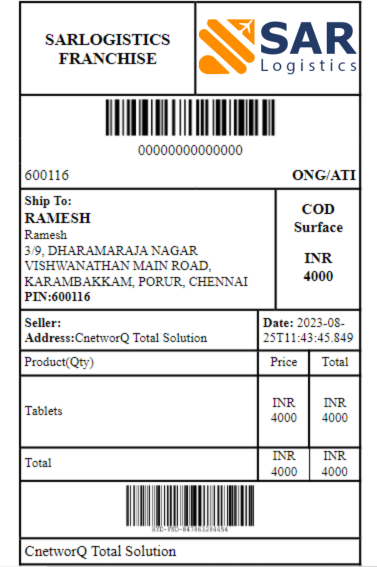
Packing slip API all waybill number is again an advance API to integrate, as same shipping label can be fetched directly from the CL panel.
It's a GET API, which returns the response in JSON that needs to be rendered into HTML using encoding 128 and gets the appropriate layout of the shipping label. While generating the label from the JSON response, the client can add any other required information from their side on the label to create a custom label.
| Test Environment URL |
| https://workstation.cnetworq.com/API-sar/API/package-slip?wbns= |
| Production Environment URL |
| https://api.sarlogistics.in/api/package-slip?wbns= |
| Params | Mandatory | Value Type | Description |
| wbns | Yes | String | Waybill for which packing slip needs to be get printed |
In case a direct shipping label PDF is required, then additional param (pdf=true) can be added to the API URL, and in response s3 link and base64 URL of the shipping label can be fetched.
We have attached below a design of packing slip that will give the idea of how the packing slip should look like.
curl --request GET \
--url "https://api.sarlogistics.in/api/package-slip?wbns=" \
--header "Content-Type:application/json"\
--header "Authorization: Token XXXXXXXXXXXXXXXXXX" \
In order to inform the SAR logistics for the order to be picked up from the warehouse, pickup request creation API facilitates creation of a pickup request in SAR logistics system to further collect the shipments.
Multiple pick-up requests can be made in one day but only after one pick-up request has been completed. Once the shipments have been picked up by SAR logistics then you can schedule another pick-up request. This is applicable when the pick-ups are made for a single warehouse. If there are multiple warehouses you can schedule multiple pick-up requests at the same time for two different warehouses.
It takes the four inputs, i.e., pickup time, date, warehouse name, and the quantity and return pickup_id in a successful response.
This API is also optional as pick-up request can be created through CL panel as well.
| Test Environment URL |
| https://workstation.cnetworq.com/sarlogistics/testing/pickup-request |
| Production Environment URL |
| https://api.sarlogistics.in/api/pickup-request |
| Params | Mandatory | Value Type | Description |
| pickup_time | Yes | date-time | Time for the pickup(hh:mm:ss) |
| pickup_date | Yes | date | Date for the pickup(YYYY-MM-DD) |
| pickup_location | Yes | String | Registered client warehouse / pick up location in the system |
| expected_package_count | Yes | Integer | Expected count for the packages to be picked |
curl --request POST \
--url "https://api.sarlogistics.in/api/pickup-request" \
--header "Content-Type:application/json"\
--header "Accept:application/json"\
--header "Authorization: Token XXXXXXXXXXXXXXXXXX" \
--data '{
"pickup_time": "" ,
"pickup_date": "",
"pickup_location": "",
"expected_package_count": ""
}'
Our system consider every physical pickup location from where order needs to be picked up as a warehouse. Only for registered pickup locations/warehouses, order creation is allowed and hence before creating an order, the client warehouse needs to be created in our system.
Note: Integration of this API is completely optional, as the same can be created by our FMS team which creates warehouses on behalf of the client as it is only a one-time activity. But if the business use case demands dynamic pickup locations addition, then this API is good to integrate with. In this API payload, random key-value pair of fields are not allowed. Only mentioned fields in the payload are allowed.
Successful response of the API returns the details which have been passed in the fields of the payload in the API along with the success message in JSON format.
| Test Environment URL |
| https://workstation.cnetworq.com/sarlogistics/testing/warhouse-creation |
| Production Environment URL |
| https://api.sarlogistics.in/api/warhouse-creation |
curl --request POST \
--url "https://api.sarlogistics.in/api/warhouse-creation" \
--header "Content-Type:application/json"\
--header "Accept:application/json"\
--header "Authorization: Token XXXXXXXXXXXXXXXXXX" \
--data '{
"name": "",
"email": "",
"phone": "",
"address": "",
"city": "",
"country": "",
"pin": "",
"return_address": "",
"return_pin": "",
"return_city": "",
"return_state": "",
"return_country": ""
}'
Client warehouse edit API facilitates to change the existing warehouse details in SAR logistics system Note : It's a POST REST Url.
| Test Environment URL |
| https://workstation.cnetworq.com/API-sar/API/warhouse-edit |
| Production Environment URL |
| https://api.sarlogistics.in/api/warhouse-edit |
| Params | Mandatory | Value Type | Description |
| name | Yes | String | Warehouse name in our system |
| registered_name | Optional | String | Registered warehouse name in our system |
| address | Optional | String | Registered address of the warehouse in our system |
| pin | Yes | String | Registered pincode of the warehouse in our system |
| phone | Optional | String | Registered phone for the warehouse in our system |
curl --request POST \
--url "https://api.sarlogistics.in/api/warhouse-edit" \
--header "Content-Type:application/json"\
--header "Accept:application/json"\
--header "Authorization: Token XXXXXXXXXXXXXXXXXX" \
--data '{
"name": "",
"registered_name": "",
"address": "",
"pin": "",
"phone": ""
}'
This API allows you to take actions on the NDR package. It having 2 API's 1. NDR API 2.Get NDR status API.
| Test Environment URL |
| https://workstation.cnetworq.com/sarlogistics/testing/NDR-api |
| Production Environment URL |
| https://api.sarlogistics.in/api/NDR-api |
| Params | Mandatory | Value Type | Description |
| waybill | Yes | String | Waybill number of the package |
| act | Yes | String | Action keyword corresponding to each action: DEFER_DLV: deferred delivery date EDIT_DETAILS: edit details RE-ATTEMPT: Re-attempt - as per NDR instructions |
| Params | Mandatory | Value Type | Description |
| deferred_date | Yes | String | Date of format 'YYYY-MM-DD' |
| Params | Mandatory | Value Type | Description |
| name | No | String | Consignee name |
| phone | No | String | Consignee phone number |
| add | No | String | Consignee address |
curl --request POST \
--url "https://api.sarlogistics.in/api/NDR-api" \
--header "Content-Type:application/json"\
--header "Accept:application/json"\
--header "Authorization: Token api-token-key Pass Token as 'Token XXXXXXXXXXXXXXXXXX'" \
--data '{
"waybill": "",
"act": "",
"deferred_date": "",
"name": "",
"phone": "",
"add": ""
}'